Understanding Recursive Language Models: Managing Long Contexts
A deep dive into RLMs - a new inference paradigm that lets LLMs process millions of tokens by treating context as a part of an external environment which a LLM can interact with. Includes a minimal implementation from scratch.
Large Language Models are incredibly powerful, but they have a fundamental limitation: they can only "see" a fixed window of text at once. What happens when your data doesn't fit? You lose information, you lose accuracy, and in many cases, you simply can't get the answer you need.
Recursive Language Models (RLMs) take a different approach. Instead of stuffing everything into the context window, the model writes code to access and process the data - chunking, searching, and calling sub-LLMs as needed.
In this post, I'll break down:
- Why long context is fundamentally hard for LLMs
- What "context rot" means and why it matters
- How RLMs work (architecture + intuition)
- My experiments: needle-in-haystack and BrowseComp-Plus benchmark results
- A minimal implementation you can run yourself
The Problem: LLMs and Long Context
Despite progress in reasoning and tool use, modern language models still have limited context lengths. And even within these limits, they exhibit context rot - the quality of even frontier models like GPT-5 degrades as context gets longer.
Context lengths will continue to rise through improvements to training, architecture, and infrastructure. But can we scale context size by orders of magnitude? This matters because LLMs are increasingly used for long-horizon tasks where they must process tens, sometimes hundreds of millions of tokens.
Hard Limits
Current models max out at 100K-200K tokens. The common workaround is context compaction - repeatedly summarizing context once it exceeds a threshold. But compaction is lossy. It's rarely expressive enough for tasks that require dense access to the original content.
Context Rot
Even when data fits within the context window, LLMs struggle to use it effectively. Chroma's research on context rot showed that models don't process context uniformly - performance degrades as input length increases, even on simple tasks.
So we have two problems: hard limits on what fits, and degraded performance on what does fit. RLMs address both.
What Is an RLM?
A Recursive Language Model is not a new model architecture or training method. It's an inference-time method that how LLMs interact with large contexts.
The key insight: instead of feeding the entire context as raw tokens, treat it as data in a programming environment. The LLM writes code to:
- Explore the context (peek at sections, search for patterns)
- Transform it (chunk, filter, extract)
- Delegate semantic analysis to sub-LLMs on manageable pieces
- Aggregate results into a final answer
This solves both problems:
- No hard limit: The context lives in memory as a variable, not in the prompt
- No position bias: The model explicitly reads what it needs, when it needs it
How RLMs Work: The Architecture
The RLM architecture has three core components:
1. The REPL Environment
A sandboxed Python environment where the LLM's code runs. It comes pre-loaded with:
context: A variable containing all the user's data (can be gigabytes)llm_query(prompt): A function to call sub-LLMs from within code- Standard Python:
print(), string manipulation, regex, loops, etc.
The LLM never sees the raw context in its prompt - only the metadata.
2. The Root LLM
The main model orchestrating the analysis. It receives:
- A system prompt explaining the REPL environment
- The user's query
- Execution outputs from previous iterations
It outputs reasoning plus code blocks to execute.
3. The Iteration Loop
The core control flow:
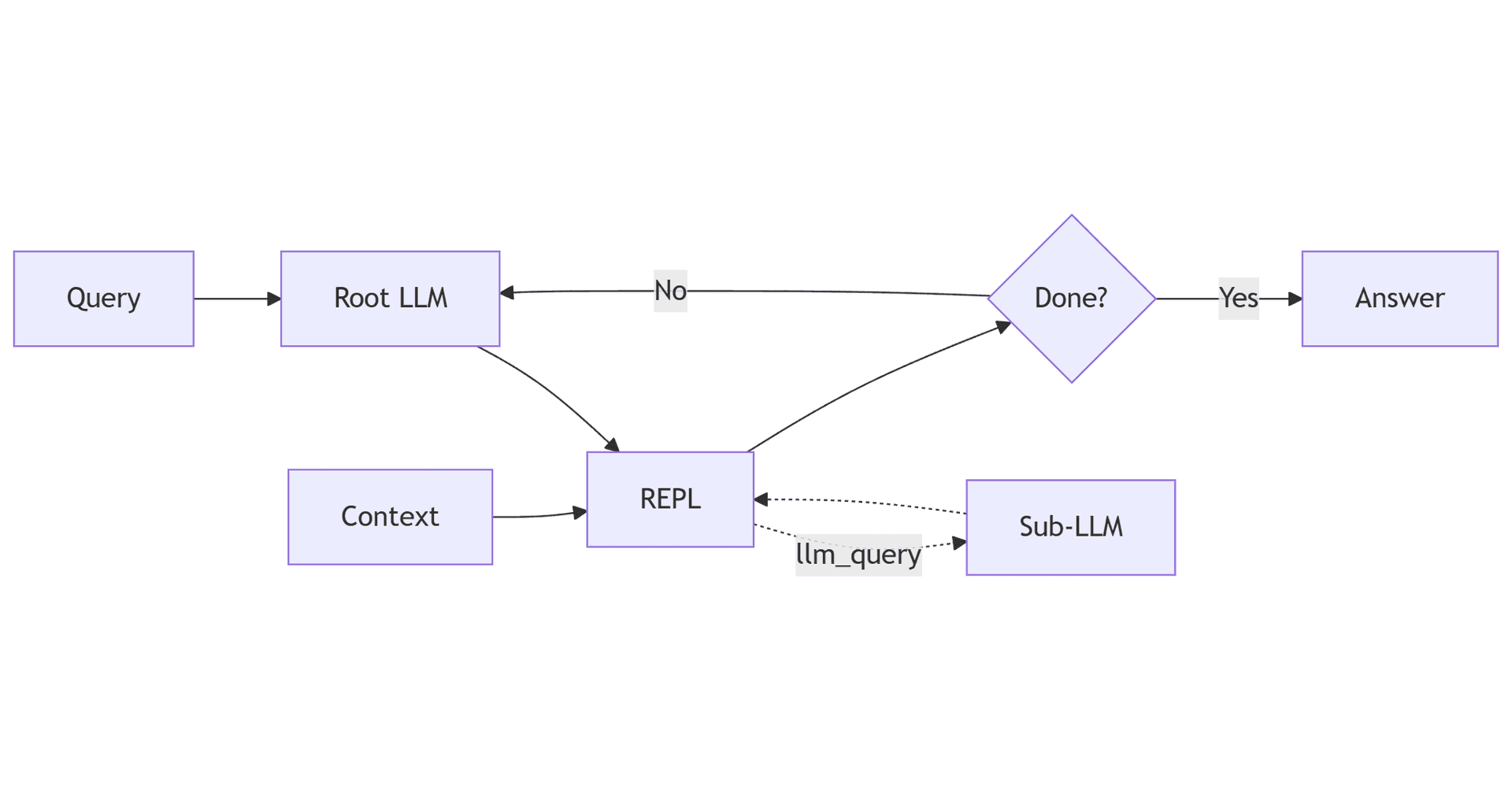
Example Execution Flow
Let's say we want to find information across 1000 documents (10M+ tokens):
Iteration 1: LLM explores the context structure
# LLM writes:
print(f"Context type: {type(context)}")
print(f"Number of documents: {len(context)}")
print(f"First doc preview: {context[0][:500]}")
Output reveals it's a list of 1000 document strings.
Iteration 2: LLM chunks and queries sub-LLMs
# LLM writes:
query = "What is the company's revenue growth strategy?"
answers = []
for i in range(0, len(context), 100):  # 100 docs per chunk
    chunk = "\n".join(context[i:i+100])
    answer = llm_query(f"Answer if possible: {query}\n\nDocuments:\n{chunk}")
    answers.append(answer)
    print(f"Chunk {i//100}: {answer[:100]}...")
Sub-LLMs analyze ~100 docs each, returning summaries.
Iteration 3: LLM aggregates and returns final answer
# LLM writes:
final_answer = llm_query(f"Synthesize these findings about revenue growth:\n{answers}")
print(final_answer)
Then outputs: FINAL(The company's revenue growth strategy involves...)
The entire 10M token context was processed without ever hitting the context limit.
Why This Works
RLMs leverage several powerful ideas:
1. Separation of storage and processing
The context exists in code memory (unlimited), while the LLM only needs to process small prompts (within its window).
2. Active information retrieval
Instead of passively reading, the model actively decides what to look at. The model has explicit control over which information is included in its context, leading to more focused and relevant processing.
3. Divide and conquer
Complex analysis is decomposed into smaller sub-problems. Each sub-LLM call processes a manageable chunk.
4. Stateful iteration
Variables persist across iterations. The model can build up understanding incrementally, saving intermediate results.
Benchmarks and Results
The original RLM paper evaluated on four task types:
- S-NIAH (single needle-in-the-haystack): Find a specific phrase or number within a large set of unrelated text. The answer is always present, and the core challenge is picking out one item from a massive context.
- BrowseComp-Plus: Answer multi-step, challenging questions by reasoning over multiple documents. The corpus is guaranteed to contain gold evidence and distractor documents, requiring the model to piece together the answer from several sources.
- OOLONG: Requires examining and transforming nearly all chunks in the input, then aggregating them to form the final answer—essentially a long-range aggregation/labeling task over a dataset.
- OOLONG-Pairs: A more complex variant where each query requires aggregating over all pairs of entries in a dataset, testing the model's ability to reason over quadratic combinations and relationships.
My Experiments
To really understand RLMs, I built my own implementation and ran some small experiments. Here's what I found.
Experiment 1: Needle in a Haystack
The classic test. 100,000 lines of random words, one line contains "The magic number is 7859422" buried at line 61,312. Total context: ~4MB.
Iteration 1 - Model explores the context structure:
print(context[:1000])
# Output: "zeta amet gamma brown zeta\nbeta jumps over\n..."
Sees it's random word soup. No magic number visible in the first 1000 chars.
Iteration 2 - Model plans a chunking strategy:
chunk_size = 500_000
num_chunks = len(context) // chunk_size + 1
print(f"Total chunks: {num_chunks}")  # Output: 9
4MB context / 500K per chunk = 9 chunks to process.
Iteration 3 - Model queries sub-LLM on each chunk:
buffers = []
for i in range(num_chunks):
    chunk_str = context[i*chunk_size : (i+1)*chunk_size]
    answer = llm_query(f"Is there a magic number hidden in this text? {chunk_str}")
    buffers.append(answer)
    print(f"Chunk {i+1} answer: {answer}")
9 sub-LLM calls. Most chunks return guesses (42, 138, etc). But chunk 6 returns: "The magic number is 7859422."
Iteration 4 - Model aggregates and concludes:
Based on the responses from all 9 chunks:
- Most chunks give speculative answers
- Chunk 6 explicitly states: "The magic number is 7859422"

FINAL(The hidden magic number is 7859422.)
Result: Correct answer in 4 iterations. The model autonomously figured out the chunking strategy, delegated to sub-LLMs, and aggregated the results.
Experiment 2: BrowseComp-Plus Benchmark
For a more rigorous test, I ran my implementation on BrowseComp-Plus - a challenging benchmark designed to evaluate AI agents on hard-to-find, multi-hop questions.
What is BrowseComp-Plus?
BrowseComp was created by OpenAI to test whether AI can find information that's genuinely hard to locate. The questions are crafted so that:
- Answers don't appear on the first pages of search results
- Multiple documents must be cross-referenced to piece together the answer
- Each answer is short (a name, date, or number) - easy to verify, hard to find
BrowseComp-Plus extends this with a verified offline corpus of 100K documents. For each question, the corpus is guaranteed to contain the gold answer documents along with hard negatives (similar but irrelevant documents that could mislead the model).
Example question:
"This vegetable stew uses fish, but adding meat is possible. It also uses a salty and intense condiment, which is the critical ingredient of the dish. As of 2023, a township holds a celebration named after this stew. Between 1995 and 2005 inclusive, this festivity began after authorities shifted the highlight and subject of their event to set them apart from other areas in the region that use the same product in their celebrations. This town holds the event every year after February but before September. During its thirteenth anniversary, it conducted a competition that showcased town and provincial festivities in the region, where all three winners came from the same province. A beauty pageant was also a part of the celebration. What are the first and last names of the person who won that contest that year?"
Expected answer: Maria Camille Dalmacio
To answer this, you need to find the right dish, locate the township festival, identify the 13th anniversary year, and extract the beauty pageant winner. Multiple documents, multiple hops.
You can view a full execution trajectory here to see exactly how the RLM processes a BrowseComp query step-by-step.
My Results
Due to cost and time constraints, I ran on a subset of the benchmark in a Modal sandbox:
- Queries evaluated: 137
- Correct: ~89
- Incorrect: ~48
- Accuracy: ~65%
Configuration:
- Root model:
gpt-4.1(via OpenRouter) - Sub-model:
gpt-4.1-nano - Documents per query: 500
- Max iterations: 15
For context, this benchmark is hard. Even frontier models with browsing capabilities struggle on the original BrowseComp. The RLM paper reports 91.3% accuracy, but that was with GPT-5 and 1000 documents per query.
My 65% accuracy with a more modest setup with a lesser competent model than GPT-5 (GPT-4.1, 500 docs) suggests the approach works.
What I Learned
-
Chunking strategy matters: The model needs to be smart about how it divides context. Too small = too many sub-LLM calls. Too large = sub-LLM can't process it.
-
Sub-LLM quality: Using a cheaper model (
gpt-4.1-nano) for sub-calls worked fine. The root LLM does the hard reasoning; sub-LLMs just extract facts. -
Some queries are just hard: Many failures were on questions requiring very specific cross-document reasoning that even humans would struggle with.
Full paper reproduction pending - need more time and API credits.
Limitations
From the paper:
- Synchronous execution: The paper used synchronous sub-calls in a Python REPL. Asynchronous sub-calls and sandboxed REPLs could reduce runtime and cost significantly.
- Shallow recursion: Max recursion depth was set to 1 (sub-calls are plain LMs, not RLMs themselves). Deeper recursion layers remain unexplored.
- No RLM-specific training: Experiments used existing frontier models. Training models explicitly to be RLMs (as root or sub-LMs) could improve performance - current models are inefficient decision makers over their context.
- RLM trajectories as reasoning: The paper hypothesizes that RLM execution traces can be viewed as a form of reasoning, which could potentially be trained via bootstrapping.
From my experiments:
- I only tested
gemini-3-proon a handful of queries (10-15) andgpt-4.1on a subset of the benchmark (137 queries). Not comprehensive. - Didn't test with SOTA models like
gpt-5that the paper used.
What I want to try next:
- Run on stronger models -
opus-4.5,gpt-5, and open-source models likekimi-k2 - One observation: Opus 4.5 and Claude models heavily use bash commands and grep when given tool access. Extending the RLM REPL beyond pure Python - combining codegen with shell command execution - could make chunking/search strategies more powerful.
- Study Prime Intellect's RLM experimental setup. They've built RL environments to train models to use RLM. Current models are good at tool calling, but training them to be good at context folding in multi-turn conversations could unlock truly long-running AI agents.
Conclusion
RLMs represent a paradigm shift in how we think about LLM context limitations:
Instead of making context windows bigger, make the LLM smarter about how it accesses context.
This works purely at inference time - with no model changes - makes it immediately practical. You can start using RLMs today with any capable code-generating model.
Appendix: Building an RLM from Scratch
Now let's implement a minimal RLM step by step. This is a simplified version focused on the core primitives - you can extend it for production use.
Prerequisites
pip install litellm
You'll need an API key for your LLM provider (OpenAI, Anthropic, Google, or via OpenRouter).
Part 1: The REPL Environment
We use a local Python REPL where LLM-generated code executes. It needs:
- A sandboxed namespace
- The
contextvariable - The
llm_query()function
import sys
import io
from dataclasses import dataclass

@dataclass
class REPLResult:
    """Result from code execution."""
    stdout: str
    stderr: str
    variables: dict

class REPL:
    """Sandboxed Python execution environment."""

    def __init__(self, context, llm_query_fn):
        # Initialize namespace with context and llm_query
        self.namespace = {
            'context': context,
            'llm_query': llm_query_fn,
            'print': print,
            'len': len,
            'range': range,
            'str': str,
            'list': list,
            'dict': dict,
            'enumerate': enumerate,
            # Add other safe builtins as needed
        }

    def execute(self, code: str) -> REPLResult:
        """Execute code and capture output."""
        stdout_buf = io.StringIO()
        stderr_buf = io.StringIO()

        old_stdout, old_stderr = sys.stdout, sys.stderr
        try:
            sys.stdout, sys.stderr = stdout_buf, stderr_buf
            exec(code, self.namespace, self.namespace)
        except Exception as e:
            stderr_buf.write(f"{type(e).__name__}: {e}")
        finally:
            sys.stdout, sys.stderr = old_stdout, old_stderr

        # Extract user-defined variables
        variables = {k: type(v).__name__ for k, v in self.namespace.items()
                     if not k.startswith('_') and k not in ['context', 'llm_query']}

        return REPLResult(
            stdout=stdout_buf.getvalue(),
            stderr=stderr_buf.getvalue(),
            variables=variables
        )
Part 2: The System Prompt
This is the most critical piece - it teaches the LLM how to use the REPL environment. Below is the exact system prompt from the RLM paper (Appendix D.1). It's long, but every part matters.
The prompt is dynamically built with context metadata (type, size, chunk lengths), then includes detailed instructions and multiple worked examples. Here's the structure:
You are tasked with answering a query with associated context. You can access,
transform, and analyze this context interactively in a REPL environment that can
recursively query sub-LLMs, which you are strongly encouraged to use as much as
possible. You will be queried iteratively until you provide a final answer.

Your context is a [CONTEXT_TYPE] with [TOTAL_LENGTH] total characters, and is
broken up into chunks of char lengths: [CHUNK_LENGTHS].

The REPL environment is initialized with:
1. A 'context' variable that contains extremely important information about your
   query. You should check the content of the 'context' variable to understand
   what you are working with.
2. A 'llm_query' function that allows you to query an LLM (that can handle around
   500K chars) inside your REPL environment.
3. The ability to use 'print()' statements to view the output of your REPL code.

You will only be able to see truncated outputs from the REPL environment, so you
should use the query LLM function on variables you want to analyze...

[Multiple worked examples follow - Harry Potter book analysis, Great Gatsby queries,
markdown document parsing - showing different chunking strategies]

IMPORTANT: When you are done, provide a final answer using:
1. FINAL(your answer here) - to provide the answer directly
2. FINAL_VAR(variable_name) - to return a variable from the REPL

Think step by step carefully, plan, and execute this plan immediately in your
response -- do not just say "I will do this". Output to the REPL environment
and recursive LLMs as much as possible.
You can find the exact prompt in the RLM paper (Appendix D.1) or in my implementation on GitHub.
Key things to notice:
- Context metadata upfront: Helps the model plan a chunking strategy before diving in
- Multiple worked examples: Different strategies for different context structures
- FINAL/FINAL_VAR termination: Clear protocol for signaling completion
Part 3: Parsing Utilities
Extract code blocks and detect final answers:
import re

def find_code_blocks(text: str) -> list[str]:
    """Extract ```repl or ```python code blocks."""
    pattern = r'```(?:repl|python)\s*\n(.*?)\n```'
    matches = re.findall(pattern, text, re.DOTALL)
    return [m.strip() for m in matches] if matches else []

def find_final_answer(text: str) -> str | None:
    """Detect FINAL(answer) in response."""
    match = re.search(r'FINAL\(([^)]+)\)', text)
    return match.group(1).strip() if match else None
Part 4: The RLM Class
Now we put it all together:
from litellm import completion

class RLM:
    """Minimal Recursive Language Model implementation."""

    def __init__(self, model: str, sub_model: str, max_iterations: int = 15):
        self.model = model
        self.sub_model = sub_model
        self.max_iterations = max_iterations

    def _call_llm(self, messages: list[dict]) -> str:
        """Call the LLM API."""
        response = completion(model=self.model, messages=messages)
        return response.choices[0].message.content or ""

    def _create_llm_query_fn(self):
        """Create the llm_query function for the REPL."""
        def llm_query(prompt: str) -> str:
            response = completion(
                model=self.sub_model,
                messages=[{"role": "user", "content": prompt}]
            )
            return response.choices[0].message.content or ""
        return llm_query

    def completion(self, context, query: str) -> str:
        """Main entry point - process context and answer query."""

        # Initialize REPL with context and llm_query
        llm_query_fn = self._create_llm_query_fn()
        repl = REPL(context=context, llm_query_fn=llm_query_fn)

        # Initialize conversation
        messages = [
            {"role": "system", "content": SYSTEM_PROMPT},
        ]

        # Iteration loop
        for iteration in range(self.max_iterations):
            print(f"\n=== Iteration {iteration + 1} ===")

            # Build prompt
            if iteration == 0:
                user_prompt = f"Query: {query}\n\nExplore the context first."
            else:
                user_prompt = f"Query: {query}\n\nContinue analysis or provide FINAL answer."

            # Call LLM
            current_messages = messages + [{"role": "user", "content": user_prompt}]
            response = self._call_llm(current_messages)
            print(f"LLM Response:\n{response[:500]}...")

            # Extract and execute code
            code_blocks = find_code_blocks(response)

            if code_blocks:
                for code in code_blocks:
                    print(f"\nExecuting:\n{code}")
                    result = repl.execute(code)
                    print(f"Output: {result.stdout[:300]}...")

                    # Add execution result to history
                    messages.append({
                        "role": "user",
                        "content": f"Code:\n{code}\n\nOutput:\n{result.stdout}\n{result.stderr}"
                    })

            # Check for final answer
            final = find_final_answer(response)
            if final:
                print(f"\n=== FINAL ANSWER ===\n{final}")
                return final

        return "Max iterations reached without final answer"
Part 5: Using the RLM
# Example usage
if __name__ == "__main__":
    # Create a large context (simulating documents)
    documents = [f"Document {i}: This contains information..." for i in range(100)]
    context = "\n\n".join(documents)

    # Initialize RLM
    rlm = RLM(
        model="gpt-4o",           # Root LLM
        sub_model="gpt-4o-mini",  # Sub-LLM for chunks
        max_iterations=10
    )

    # Run query
    answer = rlm.completion(
        context=context,
        query="What is the main topic discussed across these documents?"
    )
    print(f"Answer: {answer}")
References
- RLM Paper (arXiv:2512.24601) - Original Recursive Language Models paper
- RLM Minimal Implementation - Alex Zhang's reference implementation
- My Implementation - Code from this blog post
- Context Rot Research - Chroma's analysis on LLM context degradation
- Prime Intellect RLM Blog - Their experimental setup and RL environments for training RLM